Table of Contents

MegaTrackerFrameFilter 组件参考

切换到 API

探索 MegaTrackerFrameFilter 组件窗口中的各项属性以自定义相机参数。

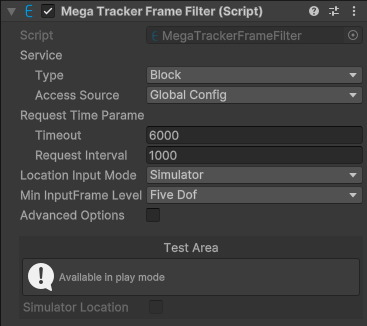
alt text

默认条件下组件截图。

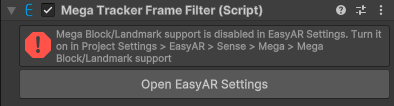
alt text

未导入 com.easyar.mega 包,组件不可时的截图。

MegaTrackerFrameFilter 组件窗口由两个部分组成:组件配置和测试区域。

组件配置

属性 描述
Service 服务访问信息。
        Type EasyAR Mega 服务类型。选项:
  • Block:Mega Block。
  • Landmark:Mega Landmark。
        Access Source 服务访问数据源类型。选项:
                App ID Access Source 是 API Key 或 Token 时显示。
服务AppID。
                Server Address Access Source 是 API Key 或 Token 时显示。
服务地址。
                API Key Access Source 是 API Key 时显示。
API Key。
                API Secret Access Source 是 API Key 时显示。
API Secret。
                Token Access Source 是 Token 时显示。
Token。
Request Time Parameters 请求时间参数。
        Timeout 与服务器通信的超时时间(毫秒)。
        Request Interval 期望的请求间隔时间(毫秒),值越大整体误差越大。
Location Input Mode 位置输入模式。选项:
  • Onsite:在现场使用的情况的输入模式。GNSS 数据通常从设备获取并输入到 Mega,通常由 MegaTrackerFrameFilter 内部处理。
  • Simulator:远程调试或电脑上运行必须使用的输入模式,GNSS 数据需要模拟成现场数据并通过对应接口输入 Mega。可选。
  • FramePlayer:在使用 FramePlayer 时的输入模式。这个模式是只读的。
远程调试或电脑上运行必须设置成 Simulator 模式,否则将无法使用。现场使用要设置成 Onsite 以达到最佳效果。
Min Input Frame Level 输入帧最小允许的 MegaInputFrameLevel。如果 frame source 只能给出维度更低的 CameraTransformType 的数据,session 会启动失败。选项:
  • ZeroDof:0DoF。
  • ThreeDof:3DoF。
  • FiveDof:5DoF。
  • SixDof:6DoF。

测试区域

测试功能在 Unity play 模式下可用。

服务类型是 Block 时,测试区域显示 Block 测试功能:

alt text

可以模拟 GNSS 数据进行测试。

服务类型是 Landmark 时,测试区域显示 Landmark 测试功能:

alt text

可以模拟 GNSS 数据进行测试。

可以模拟 MegaLandmarkFilterWrapper.FilterBySpotId(string, Action<MegaLandmarkFilterResponse>)MegaLandmarkFilterWrapper.FilterByLocation(Action<MegaLandmarkFilterResponse>) 执行。